





How do I store my IQOS ORIGINALS DUO device?
- You should store your IQOS ORIGINALS DUO in a dry ventilated place and keep it within its operating temperature range (0°C - 40°C). Make sure not to expose it to excessive heat or moisture. If you haven’t used your IQOS ORIGINALS DUO for a while first ensure it is within its operating temperature range then try to charge it fully before using it.
Can I charge IQOS ORIGINALS DUO device using the charging cable from other electronic devices?
- You won’t need to because IQOS ORIGINALS DUO device comes with it's own AC Power Adaptor and dedicated charging cable.
- But you want, you can also use the AC Power Adaptor from previous IQOS device version to charge your IQOS ORIGINALS DUO device.
- Make sure you use the USB – C to USB - C Cable that comes with your IQOS ORIGINALS DUO device, but USB cables from IQOS 2.4 /2.4 PLUS are not compatible with IQOS ORIGINALS DUO because they are USB A – micro-USB cables.
Can I charge IQOS ORIGINALS DUO with an older AC adaptor/charger?
- You can use the IQOS AC Power Adaptor from previous IQOS device version to charge your IQOS ORIGINALS DUO device. But please be careful to use the right cable if considering a cable from an older device.
- For IQOS ORIGINALS DUO, USB cables from IQOS 2.4 /2.4+ are not compatible because they are USB A – micro-USB cables.
How do I check how many uses I have left on my IQOS ORIGINALS DUO?
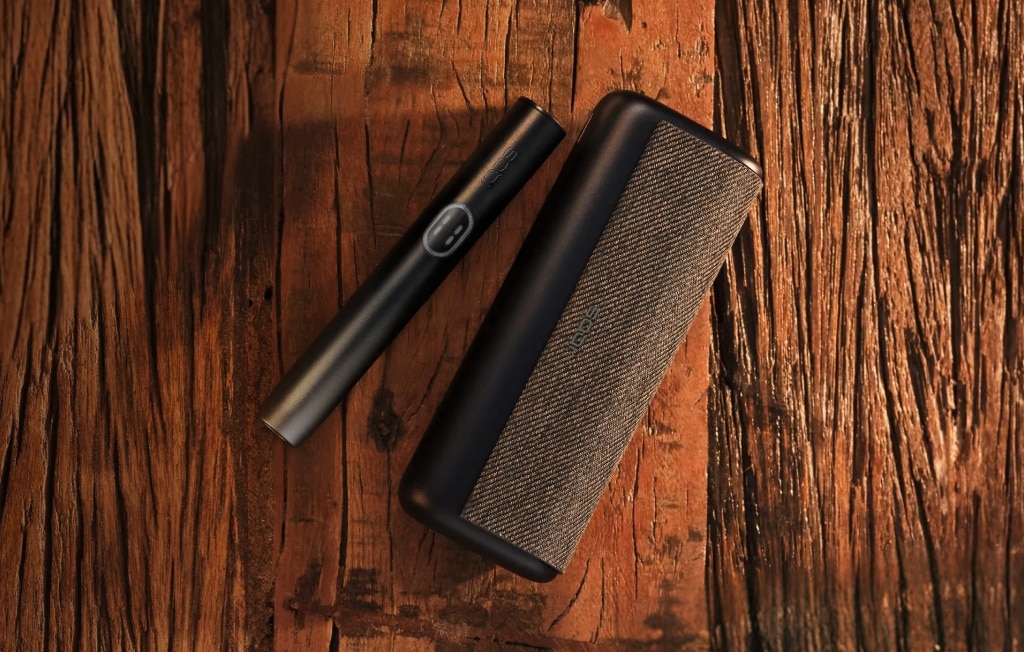
- You can check either on the Holder itself or on the Pocket Charger. In either case, you can press and release the Button (on the Holder /Pocket Charger).
- In both cases, 2 white LED lights indicates the Holder has two uses, 1 white LED light indicates one use remains and no light indicates the Holder is not charged.
How can I check my IQOS ORIGINALS DUO device is fully charged?
- It’s easy to check:
Press and release the Pocket Charger Button. The Pocket Charger Status light will turn ON for 3 seconds to indicate battery status where 4 LEDs illuminating mean it is more than 75% charged and 1 LED indicates the need to charge.
What does it mean when a red LED lights up or flashes on my IQOS ORIGINALS device?
- For IQOS ORIGINALS DUO, a red light blinking on the Holder indicates the Holder is discharged, there is a malfunction or a broken blade. If the bottom Pocket Charger light blinks red, you should perform a reset.
What do the lights on my IQOS ORIGINALS DUO mean?
- White lights on the Holder or the Pocket Charger indicate your IQOS ORIGINALS DUO device performs different operations including charging, resetting, ready to use status, fully charged status, or Pocket Charger is out of temperature range status etc. Red lights on the Holder or the Pocket Charger indicate that there is a device error including reset required, Holder malfunction, broken blade, device outside operational temperature status etc.
How can I check my IQOS ORIGINALS DUO is charged?
- For the Holder: Press and release the button to check battery charge status. Two lights illuminated indicates your Holder is ready for 2 uses; one light for 1 use and no lights means no charge. You can also check Holder status on the Pocket Charger, by inserting the Holder, the right way up, then pressing and releasing the Pocket Charger button. Two lights illuminated indicate 2 uses remain; one light indicates 1 use and, no lights mean your Holder has no charge. The Holder can be charged up to 20 times with a fully-charged Pocket Charger.
- For the Pocket Charger: To check the charge level of the Pocket Charger, press and release the Pocket Charger Button- the status light will turn ON for 3 seconds to indicate battery status where 4 LEDs indicates your Pocket Charger is more than 75% charged while 1 LED indicates the need to charge. Although, it doesn’t need a full charge to work, we recommend fully charging the Pocket Charger before your first use.
Can I use my IQOS ORIGINALS DUO device immediately from the box?
- We recommend fully charging your new IQOS ORIGINALS DUO device with the Power Adaptor before using it (up to 120 mins). Once fully charged, press and hold the power button for 4 seconds. Then insert your tobaco heating stick, pre-heat (20 seconds) and once your device vibrates; you’re good to go.
Where can I find the IQOS ORIGINALS DUO device number?
- The serial number of your IQOS ORIGINALS DUO device is a code that consists of fourteen characters. This code is displayed on the side of your Holder.
How do I store my IQOS ORIGINALS DUO device?
- You should store your IQOS ORIGINALS DUO in a dry ventilated place and keep it within its operating temperature range (0°C - 40°C). Make sure not to expose it to excessive heat or moisture. If you haven’t used your IQOS ORIGINALS DUO for a while first ensure it is within its operating temperature range then try to charge it fully before using it.
Can I charge IQOS ORIGINALS DUO device using the charging cable from other electronic devices?
- You won’t need to because IQOS ORIGINALS DUO device comes with it's own AC Power Adaptor and dedicated charging cable.
- But you want, you can also use the AC Power Adaptor from previous IQOS device version to charge your IQOS ORIGINALS DUO device.
- Make sure you use the USB – C to USB - C Cable that comes with your IQOS ORIGINALS DUO device, but USB cables from IQOS 2.4 /2.4 PLUS are not compatible with IQOS ORIGINALS DUO because they are USB A – micro-USB cables.
Can I charge IQOS ORIGINALS DUO with an older AC adaptor/charger?
- You can use the IQOS AC Power Adaptor from previous IQOS device version to charge your IQOS ORIGINALS DUO device. But please be careful to use the right cable if considering a cable from an older device.
- For IQOS ORIGINALS DUO, USB cables from IQOS 2.4 /2.4+ are not compatible because they are USB A – micro-USB cables.
How do I check how many uses I have left on my IQOS ORIGINALS DUO?
- You can check either on the Holder itself or on the Pocket Charger. In either case, you can press and release the Button (on the Holder /Pocket Charger).
- In both cases, 2 white LED lights indicates the Holder has two uses, 1 white LED light indicates one use remains and no light indicates the Holder is not charged.
How can I check my IQOS ORIGINALS DUO device is fully charged?
- It’s easy to check:
Press and release the Pocket Charger Button. The Pocket Charger Status light will turn ON for 3 seconds to indicate battery status where 4 LEDs illuminating mean it is more than 75% charged and 1 LED indicates the need to charge.
What does it mean when a red LED lights up or flashes on my IQOS ORIGINALS device?
- For IQOS ORIGINALS DUO, a red light blinking on the Holder indicates the Holder is discharged, there is a malfunction or a broken blade. If the bottom Pocket Charger light blinks red, you should perform a reset.
What do the lights on my IQOS ORIGINALS DUO mean?
- White lights on the Holder or the Pocket Charger indicate your IQOS ORIGINALS DUO device performs different operations including charging, resetting, ready to use status, fully charged status, or Pocket Charger is out of temperature range status etc. Red lights on the Holder or the Pocket Charger indicate that there is a device error including reset required, Holder malfunction, broken blade, device outside operational temperature status etc.
How can I check my IQOS ORIGINALS DUO is charged?
- For the Holder: Press and release the button to check battery charge status. Two lights illuminated indicates your Holder is ready for 2 uses; one light for 1 use and no lights means no charge. You can also check Holder status on the Pocket Charger, by inserting the Holder, the right way up, then pressing and releasing the Pocket Charger button. Two lights illuminated indicate 2 uses remain; one light indicates 1 use and, no lights mean your Holder has no charge. The Holder can be charged up to 20 times with a fully-charged Pocket Charger.
- For the Pocket Charger: To check the charge level of the Pocket Charger, press and release the Pocket Charger Button- the status light will turn ON for 3 seconds to indicate battery status where 4 LEDs indicates your Pocket Charger is more than 75% charged while 1 LED indicates the need to charge. Although, it doesn’t need a full charge to work, we recommend fully charging the Pocket Charger before your first use.
Can I use my IQOS ORIGINALS DUO device immediately from the box?
- We recommend fully charging your new IQOS ORIGINALS DUO device with the Power Adaptor before using it (up to 120 mins). Once fully charged, press and hold the power button for 4 seconds. Then insert your tobaco heating stick, pre-heat (20 seconds) and once your device vibrates; you’re good to go.
Where can I find the IQOS ORIGINALS DUO device number?
- The serial number of your IQOS ORIGINALS DUO device is a code that consists of fourteen characters. This code is displayed on the side of your Holder.